

Chicken Road 2 demo: launch the game on this page
The launch button loads the demo in the player on this page. The third-party game is not loaded until you click. A preview image helps you recognise the interface, but is no substitute for the game's controls.
Open the demo, then wait for the controls
Click ‘Launch demo’, then wait for the stake field and Play button to appear. The loading message only indicates that the game is opening: until its controls respond, the demo is not ready.
You can close the player to return to the guide. If the game gets stuck, use ‘Reload demo’. Reloading the player does not cash out a round: it affects the display, not the game's Cash out button.
What our check actually showed
On 7 September 2026, we opened the demo from the official InOut Games product page on a desktop computer. We pressed Play, used Go, then Cash out. The return of the Play button confirmed that this virtual-money round had ended.
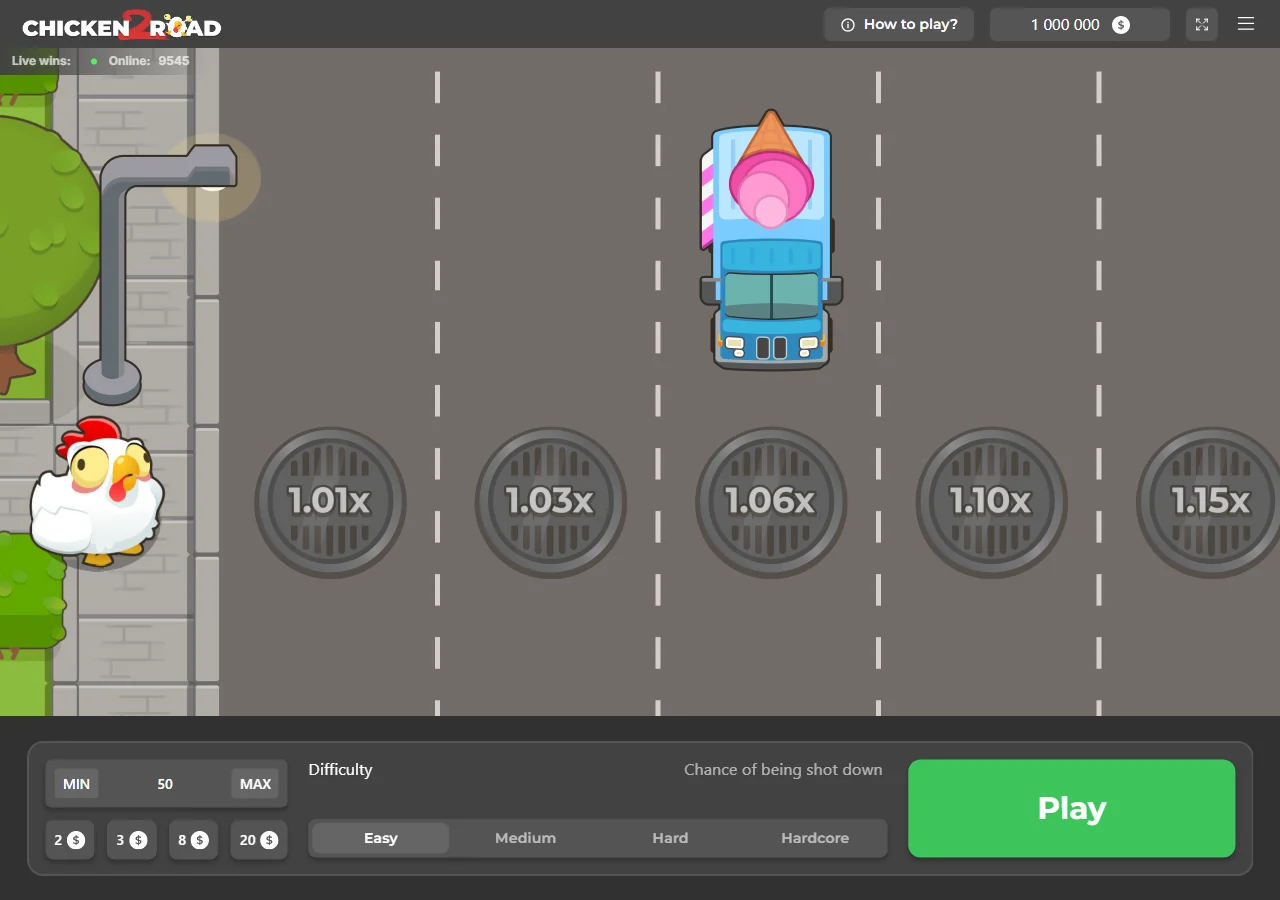
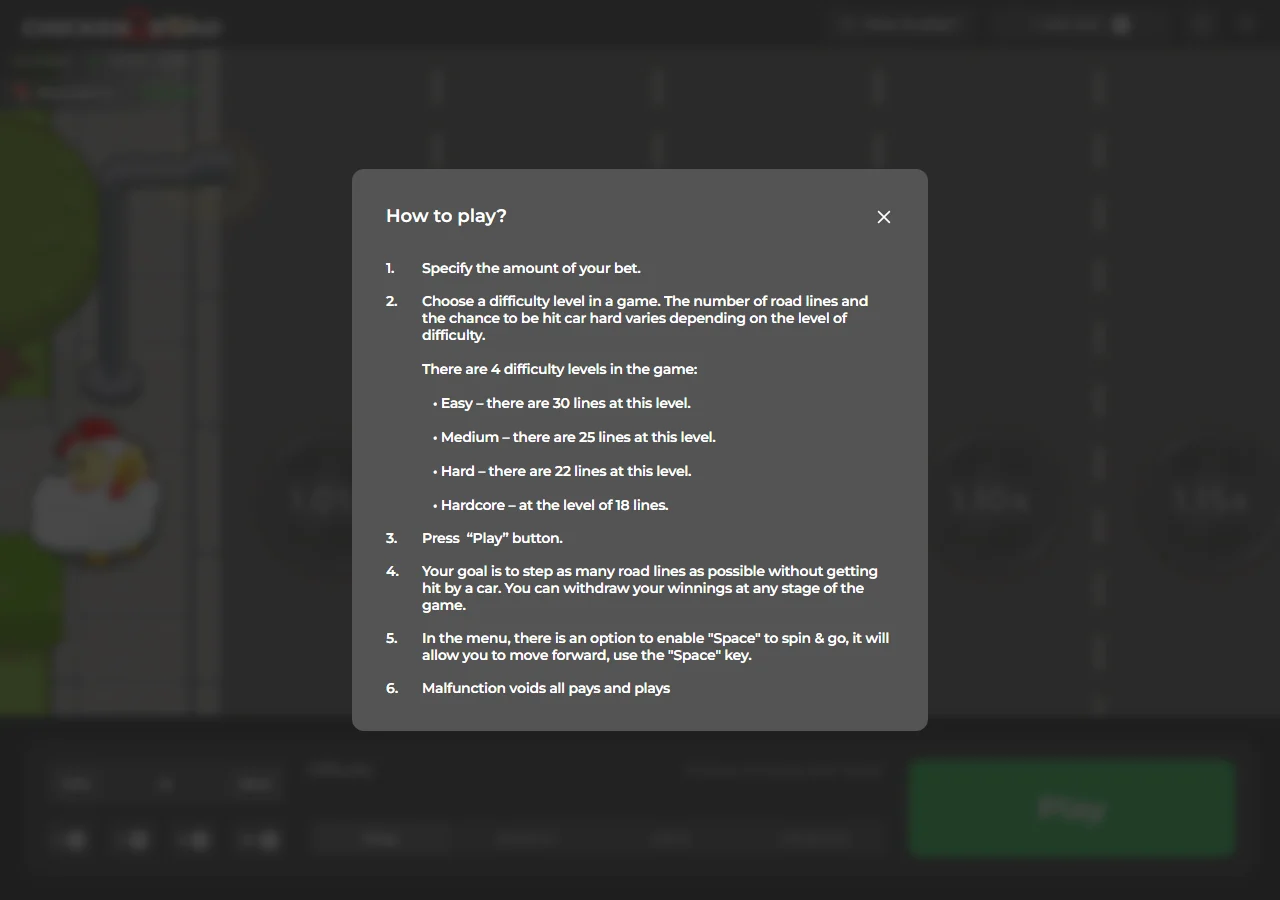
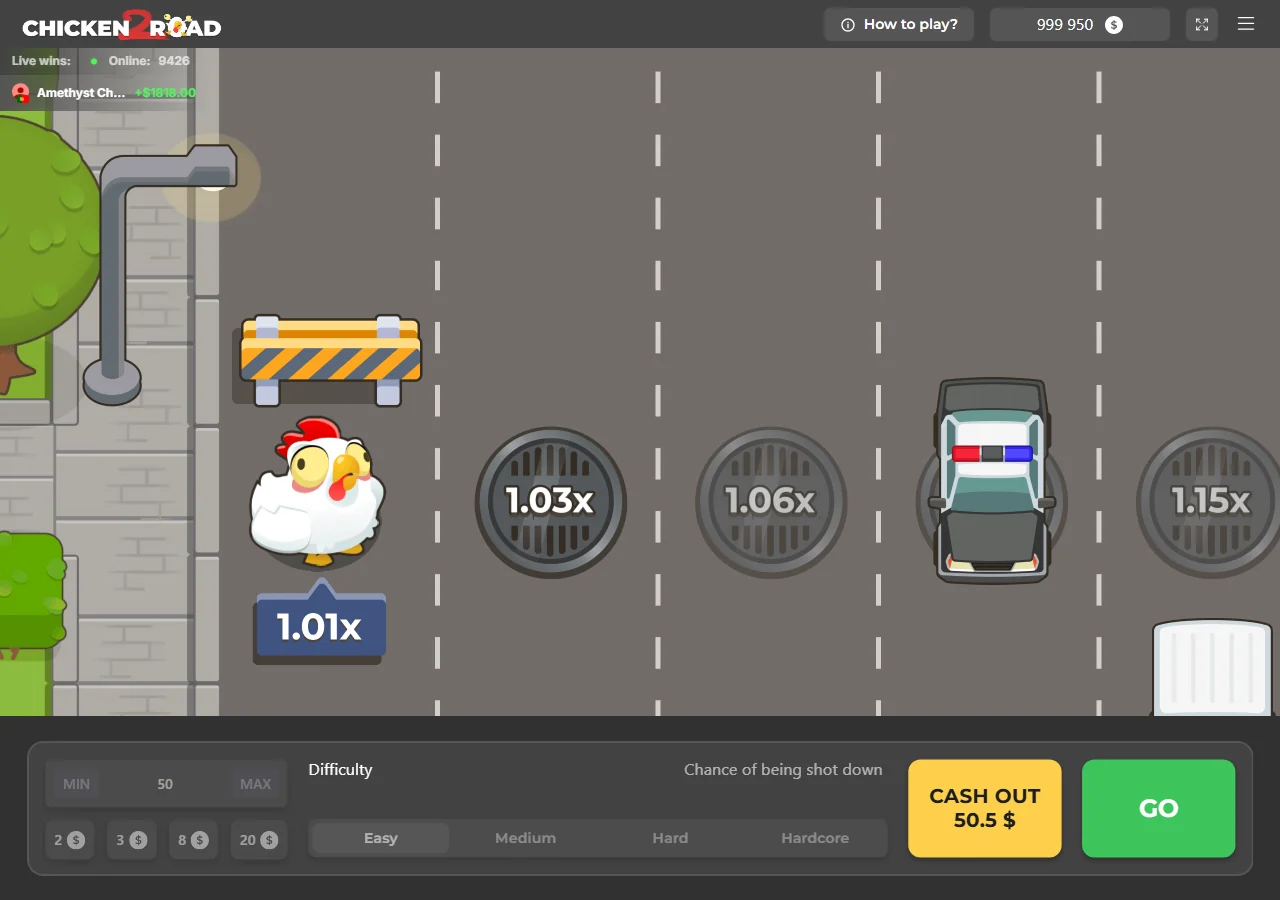
This check covered a single visit to the provider's demo, not a real-money gambling account. The three images below are older: taken on 15 August 2026, they show the initial screen, the help panel and a round after it had started.
Archive: three demo screens from 15 August 2026
Chicken Road 2: crossing the road with your stake at risk
InOut Games calls this game Chicken Road 2.0. Its product page lists a release date of 15 April 2025 and a single-player format. The setting is a road with passing vehicles: the chicken must make progress without being hit.
Reading a road rather than a slot grid
The screen shows stages with associated multipliers. The chicken changes position after successful crossings; the values still ahead are not amounts you have already secured. The decision that matters is whether to continue the round or cash out.
The help describes a risky journey, not a race against other players. The amounts in the ‘Live wins’ strip are not your balance. Our check cannot authenticate those announcements or establish that they can predict your result.
- Check the amount staked before you start.
- Distinguish the chicken's current position from the stages ahead.
- Read the amount offered by Cash out before deciding to continue.
Play, Go and Cash out: the Chicken Road 2 controls
You choose the stake and difficulty before the round. The buttons then change: Play gives way to Go and Cash out. These are the labels used in the demo we checked, and they represent three different actions.
Start with Play, move on with Go
Play commits the stake and starts the round. Go attempts to continue the journey. It is not a button for a new game: it advances the round already under way. The amount on offer changes after a successful crossing.
During our test, the stake field and difficulty options were greyed out once the round began. Set them before pressing Play. The help also mentions a ‘Space to spin & go’ menu option for using the space bar.
| Control | Function in the demo |
|---|---|
| Play | Start a round with the selected settings. |
| Go | Attempt to continue the current round. |
| Cash out | Collect the amount offered and end the round. |
Cashing out a round is not withdrawing money
Cash out stops the journey and credits the amount offered to the game balance. After we clicked it, Go and Cash out disappeared and Play returned. Starting again then requires another action.
Here, ‘cashing out’ refers to a round played with virtual credits. No bank transfer, deposit or withdrawal took place during the test. Do not confuse this button with requesting a payment from a gambling operator.
Play for real moneyThe four Chicken Road 2 difficulties
The in-game help names four levels: Easy, Medium, Hard and Hardcore. It explains that both the number of lanes and the collision risk vary with the setting. The table follows that help, which we checked again in the demo on 7 September 2026.
Routes ranging from 30 to 18 lanes
Easy has the most lanes and Hardcore the fewest. A shorter road does not mean a safer one: the setting also changes the risk involved in moving on. The lane count alone is therefore not enough to compare the chances of finishing.
| Difficulty | Lanes listed in the help |
|---|---|
| Easy | 30 |
| Medium | 25 |
| Hard | 22 |
| Hardcore | 18 |
Choose a setting before the round
To explore a level in the demo, select it before Play and look at the values marked on the road. Try the other levels in a new round. This comparison is useful for understanding the interface, not for finding a route with no losses.
We do not publish success probabilities for each lane: the help we consulted does not provide those figures. Easy and Hardcore are difficulty labels; none of the modes removes the risk of a collision.
Play for real moneySetting the stake in Chicken Road 2
The lower panel contains an amount field, MIN and MAX buttons and several preset stake buttons. The number in the field is the starting stake, not a target win. The displayed currency matters just as much as the number entered.
The stake field and preset amounts
In the session we checked, the preset buttons showed 2, 3, 8 and 20 with a dollar symbol. They change the amount before the round starts. Their presence is not a recommendation to stake any particular sum and says nothing about your budget.
Check the field after clicking a preset button. The demo's large balance is not a personal budget and should not be a reference point for choosing a real-money stake.
The limits observed are not universal
On 7 September, MIN entered 0.12 and MAX entered 200 in the demo's stake field. These are session observations, not contractual limits that apply at every operator. We selected MIN again before starting the test round.
| Check on 7 September 2026 | Displayed value |
|---|---|
| MIN button | $0.12 |
| MAX button | $200 |
| Preset stakes | $2, $3, $8, $20 |
The currency symbol on screen does not turn demo credits into dollars you can withdraw. This demo helps explain the setting; the limits on any real-money account depend on the configuration chosen by its operator.
Play for real moneyUnderstanding the Chicken Road 2 multipliers
The multiplier helps you follow a round's progress. It increases after a successful crossing, but the later stages are still ahead. Do not confuse the Cash out amount with the figures shown along the road.
The current value and the next stage
In our screenshot after Go, in Hardcore mode, the panel beneath the chicken shows x2.21. The next visible stage is marked x3.45. That second value is ahead of the chicken: it is not the amount available to cash out at that moment.
This distinction prevents the whole road being read as a promise. Continuing towards the next value means giving up the option to end the round immediately. Only a successful crossing allows that progression to continue.
Reading the amount offered by Cash out
For a virtual stake of $0.12, the button in the screenshot after Go offered $0.26. We then clicked Cash out and saw Play return. This is an observed example, not an amount to expect in another test. See also: Chicken Road 2: free demo and guide to the InOut Games title.
The amount on the button is the round's total return, not profit to add in full to the stake. Our check does not provide a complete multiplier table or a universal payout cap; we do not infer either from this screenshot. See also: Chicken Road 2: free demo and guide to the InOut Games title.
Play for real moneyWhen a Chicken Road 2 round ends
There are two distinct outcomes: choosing to cash out or suffering the collision described in the help. We tested the Cash out button during our check. We did not personally observe a collision during this latest verification.
A collision ends the journey
The help tells you to cross the lanes without being hit and allows you to cash out during a round. Continuing puts the stake and the uncollected amount at risk. A value displayed before a collision is not a payment already secured.
A new round is not a way to recover what you lost in the previous one. Increasing the stake to make up for a loss adds financial risk. This outcome is described in the rules; it is not based on a series of results measured by our team.
- Cash out: voluntarily end the round with the amount offered.
- Collision: progression stops and the committed stake is lost.
- Closing or reloading the player: a display action, not a cash-out.
Chicken Road 2 RTP: what 95.5% means
The official InOut Games product page lists an RTP of 95.5% for Chicken Road 2.0. This is a theoretical return-to-player rate, not a measurement made during our test. It does not describe the outcome of the next round.
A statistical measure, not a refund
RTP applies across a very large set of stakes under the game's mathematical model. It guarantees neither a return of 95.5% of your deposit nor a personal loss limited to a small part of your budget. A short session can produce a very different result.
The rate does not tell you how many lanes you will cross either. When comparing two games, use the same source and the correct version: the RTP published for Chicken Road must not automatically be attributed to Chicken Road 2.
No clicking rhythm guarantees a result
The help we consulted provides no technique for predicting collisions. A successful demo run, a signal sold online or playing at a particular time does not establish an advantage. We therefore do not present any setting as a winning strategy.
Deciding in advance when to stop a session can help limit the time you spend. It does not change the rate stated by the developer or remove the risk of losing a stake.
Play for real moneyChicken Road 2 on mobile: playing in the browser
We also opened the official demo using iPhone 13 emulation in Chromium. The road, stake field and Play button appeared. This display check is not a substitute for testing a physical iPhone or playing a round using touch controls.
A control panel adapted to portrait view
In the mobile screenshot, the settings sit below the road and difficulty appears in a compact selector. The Play button spans the panel's width. This layout differs from the row of difficulty options visible on our desktop screen.
Find the controls in the player before starting. Full-screen mode may make them easier to read where your browser supports it. It changes the viewing area, not the rules or the results of rounds.
What if the player does not respond?
If you can only see the preview image, the demo has not opened yet. If the loading message remains after your click, close and reload the player. A dropped connection or an unavailable provider service may prevent it from opening.
The test took place in a browser without installing an app. You do not need to find an APK file to use this web access. Do not install a download promoted as an automatic fix for a simple loading problem.
Play for real moneyRecognising the real Chicken Road 2 from InOut Games
The name Chicken Road 2 appears on guides, adverts and download pages. A name, logo or the word ‘official’ is not enough to establish who runs a page. The developer's product page is a verifiable starting point.
The full name and the provider's domain
On inout.games, the product page is titled Chicken Road 2.0 and lists 15 April 2025 as the release date, with an RTP of 95.5%. It offers Demo Play access. These details distinguish the version reviewed here from another game with the same name.
A domain resembling the studio's is not proof of ownership. The controls and setting help identify the interface, but screenshots can be copied. Cross-check the game's origin against the InOut Games product page.
Adverts, APKs and withdrawal promises
An advert showing a large cash-out does not prove a player received that money. An app featuring the chicken is no more proof of a link to the provider. Our check does not validate any APK or any real-money payment.
Keep two questions separate: does the game exist, and is the operator you are sent to authorised to offer it to you? The developer's page answers the first. On its own, it does not certify a gambling site's status in your country.
Play for real moneyChicken Road and Chicken Road 2: the confirmed differences
The two official product pages have different names and dates. Chicken Road 2 is therefore not just another name for the first game. The comparison below is limited to information checked again on InOut Games on 7 September 2026.
| Developer's information | Chicken Road | Chicken Road 2.0 |
|---|---|---|
| Listed release date | 4 April 2024 | 15 April 2025 |
| Listed RTP | 98% | 95.5% |
| Format | Single-player | Single-player |
| Theme description | A chicken heading towards a golden egg, facing hazards and the risk of being burnt. | Crossing a road with cars and trucks. |
Do not carry over figures from the first version
The two pages show different RTP figures. Quoting 98% for Chicken Road 2 would mean using the figure for Chicken Road. The full version name is therefore essential when consulting a table or review.
The first game's page also mentions four difficulties. These shared features do not prove that the routes, multipliers or amount limits are identical. We do not attribute an extra bonus or a maximum win to the sequel without a primary source.
Play for real moneyChicken Road 2: demo play and real money remain separate
The demo balance lets you try the controls without a deposit. Any amount cashed out in this environment remains virtual. Moving to an operator is a separate step: its terms, your country's rules and, if you place a stake, your money are then involved.
A partner link to mini-games, not guaranteed availability
The partner button on this page uses an internal /go/ redirect to a mini-games offering. It is not the demo button. We do not promise that Chicken Road 2 is in the catalogue at every possible destination.
Before registering, identify the operator, accepted countries, withdrawal terms and limit-setting tools. Our test does not verify any bonuses or payment timescales. You can also stick to the demo without opening an account.
- Demo: virtual credits, a chance to explore the interface, no withdrawals.
- Partner: a separate site with its own terms and availability to check.
- Affiliation: a redirect may earn a commission for the publisher of this page.
Our Chicken Road 2 review: understand it before continuing
The test confirms an interface built around a repeated decision: move on or cash out. The controls responded on desktop and the help describes the four routes. Our review concerns that hands-on experience, not the game's profitability or an operator's reliability.
What the free demo is useful for
The demo shows what changes after Play and helps distinguish the next stage from the Cash out amount. That is more informative than an advert showing only the end of a round. The in-game help also gives the lane count for each difficulty.
Its limits are clear: the credit is virtual, the tested amounts depend on the session and the mobile display was checked only through emulation. We do not invent player ratings or produce an earnings report from such a short test.
Set a time limit and recognise the urge to chase losses
This page is for adults aged 18 and over. Decide how long to spend on the demo before opening it. Wanting to keep going to undo a result, even a virtual one, is a reason to take a break rather than play rounds faster.
With real money, never stake funds needed for everyday expenses. If gambling causes stress, hidden spending or a loss of control, end the session and seek support from someone you trust or a specialist service.
Play for real money